Case Study: Visual AI Model Builder for Enterprise Users
Overview
Many organizations want to apply machine learning to business problems, but building models typically requires specialized data science expertise. This creates a bottleneck where business teams must rely on a small number of technical experts to run experiments or develop predictive solutions.
The AI Model Builder was designed to remove this barrier by enabling novice users to create and test machine learning models through a guided, no-code interface.
The product walks users through the full lifecycle of model creation, from selecting data to training and evaluating results, while simplifying complex machine learning concepts into approachable interactions.
My role was to lead the UX design for the model-building experience, translating technical workflows into a clear, structured interface that allows non-technical users to experiment with machine learning confidently.
Product Type
AI Model Builder / Visual AI Workflow Platform (Data preparation, model configuration, training, and evaluation through a guided no-code interface)
Role
Lead UX Designer
Timeline
6 Months
Team
Myself
VP Product Design
VP Engineering
Engineering Team
Product Management
Problem & Context
The Challenge
Machine learning tools are typically designed for technical audiences such as data scientists and engineers. These systems expose complex parameters, configuration options, and programming workflows that can be difficult for non-technical users to navigate.
At the same time, many business analysts and operational teams possess deep knowledge of their data and the problems they want to solve. What they lack is the ability to easily experiment with machine learning models themselves.
This gap creates several challenges:
Business teams depend on specialized data science resources to build models
Experimentation cycles are slow
Many potential machine learning use cases never get explored
The goal of this project was to enable business users to build and train machine learning models without writing code.
Primary Users
Business Analysts: Users who understand business problems and datasets but do not have machine learning expertise.
Operations Managers: Users interested in predictive insights that can improve operational efficiency.
Data-Curious Professionals: Users who want to explore machine learning but are unfamiliar with traditional ML tools.
Research & Design Activities
Understanding the Machine Learning Workflow
Working closely with engineering and data science teams, I analyzed how models are typically created and trained. This helped identify which parts of the process needed simplification for non-technical users.
Important questions included:
Which configuration options are essential for novice users?
How can the system prevent invalid model setups?
How should complex technical concepts be explained within the interface?
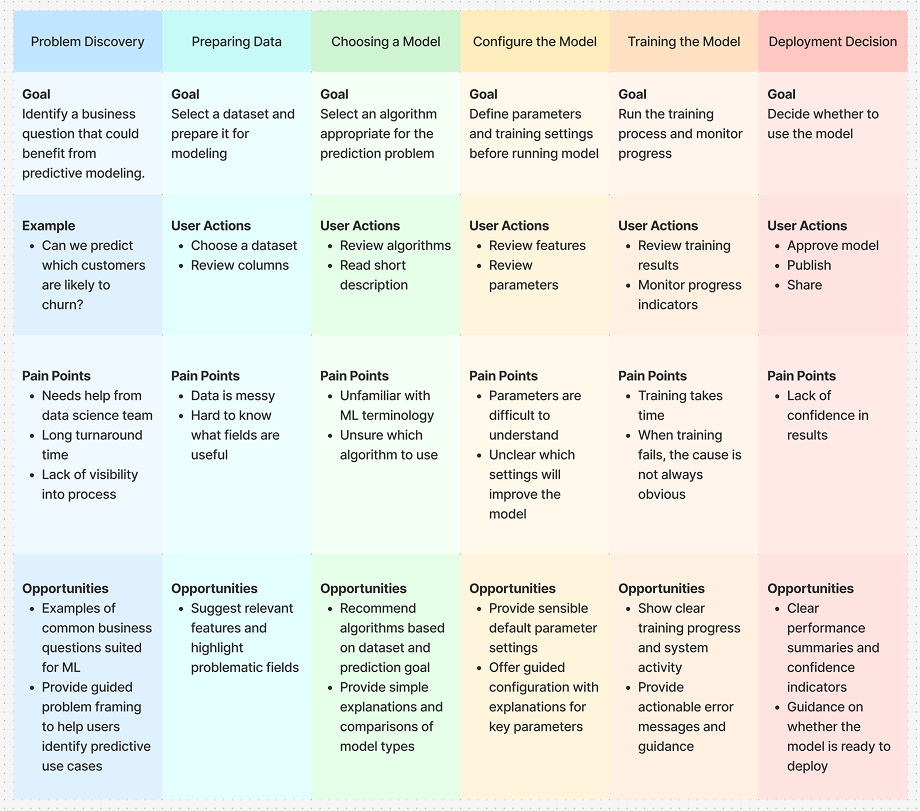
Mapping the end-to-end model building journey
I created a journey map to understand how users move from defining a business problem through training and evaluating a machine learning model. Mapping goals, actions, pain points, and opportunities at each stage helped reveal where the experience needed clearer guidance and support.
Defining the Experience
The design approach was guided by a simple principle:
Make machine learning approachable.
Rather than exposing all technical settings at once, the interface guides users through the model-building process step by step.
The workflow focuses on five core stages:
Choose a dataset
Select a model type
Configure the model
Train the model
Evaluate & Deploy
Breaking the process into structured stages helps reduce cognitive overload and keeps users focused on one decision at a time.
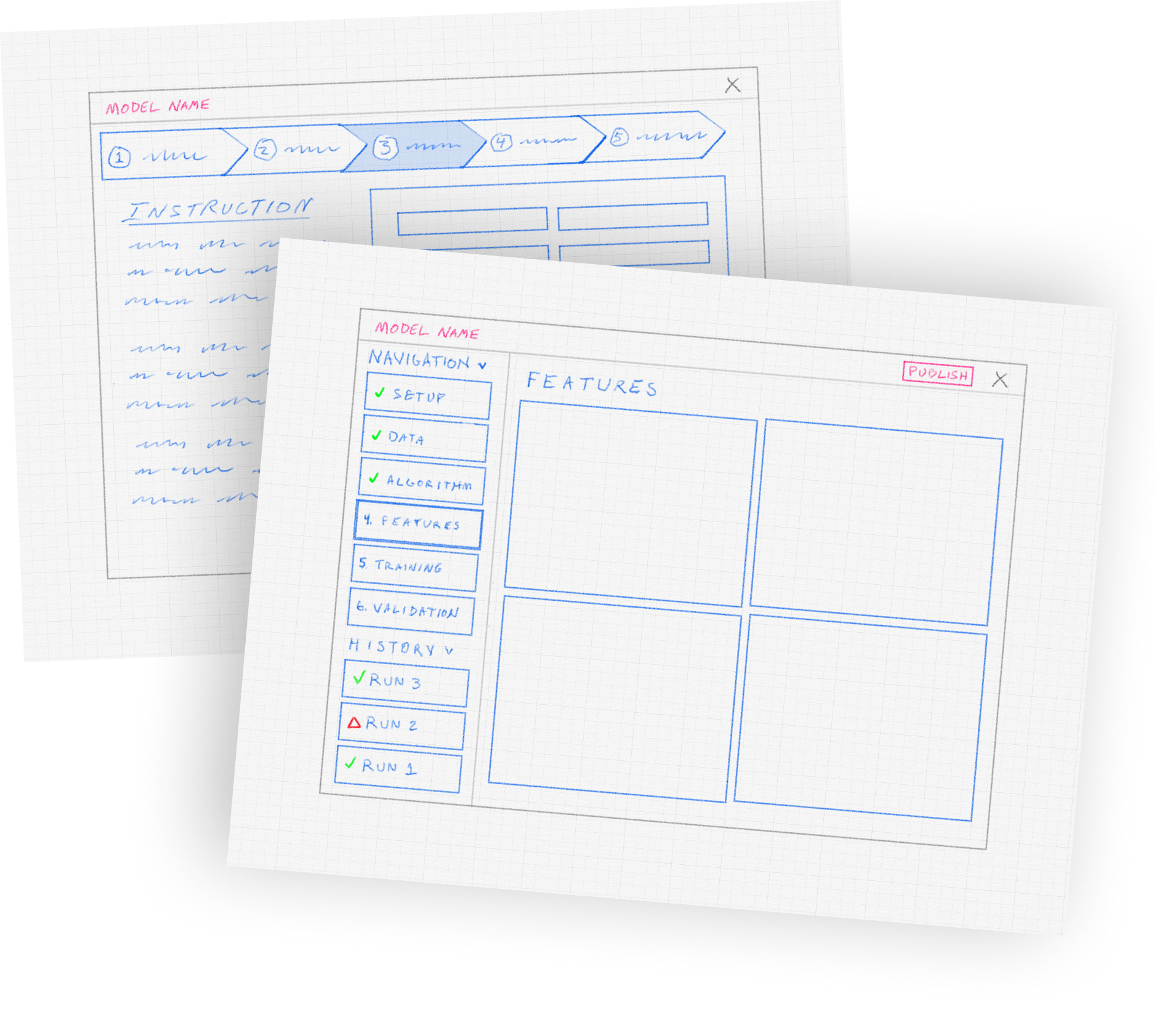
Early Interface Exploration
Before designing the final interface, I sketched several concepts to explore how the workflow could guide users step by step through building a model. The goal was to make complex machine learning tasks feel structured and approachable.
These sketches helped define several key ideas:
A step-based navigation guiding users through the modeling process
Clear progress indicators showing what stages are complete
A history panel allowing users to review previous training runs
A workspace for configuring model features and reviewing results
This early exploration informed the structure of the final interface.
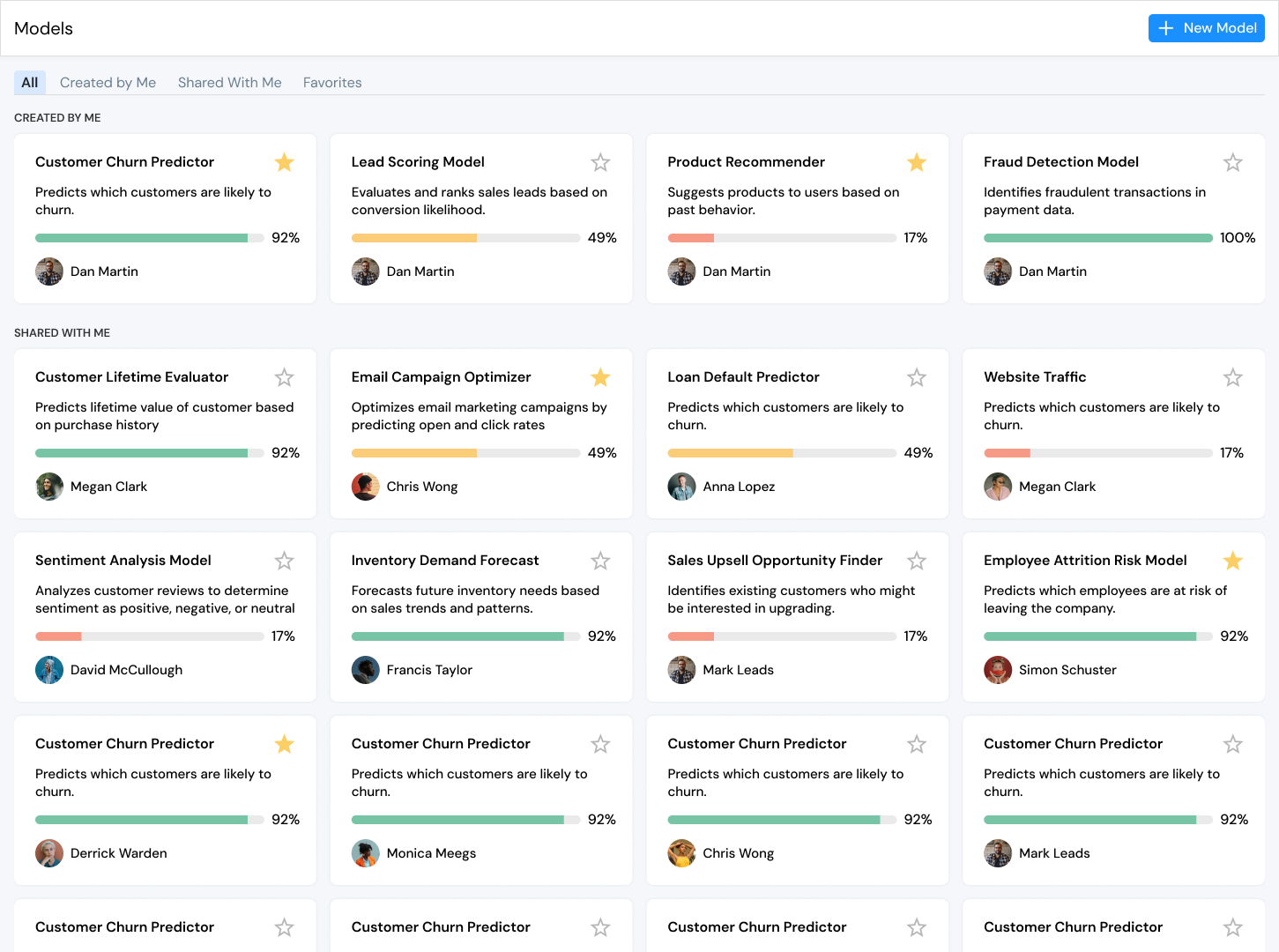
Model Dashboard
The landing page provides a central place where users can view, manage, and create machine learning models. From here, users can quickly see the status of their work and explore models created by others in the organization.
Each model is presented as a card showing key information at a glance, helping users understand what the model does and how far along it is in the training process.
The dashboard includes several useful capabilities:
View models created by the user or shared by others
See training progress through clear completion indicators
Identify model ownership and collaboratorsMark frequently used models as favorites
Quickly open a model to continue refining it
Create a new model directly from the dashboard
This page reinforces the idea that machine learning development is iterative, allowing users to revisit models, monitor progress, and build new experiments from a single workspace.
Impact
Quantitative
65%
Reduction in time required to build and train a first model
Qualitative
“I was able to build a model without needing help from the data science team.”
-Business Analyst
45%
Decrease in configuration errors during model setup
“The step-by-step workflow makes machine learning feel much less intimidating.”
-Operations Manager
50%
Increase in successful model experiments by non-technical users
“It finally feels like I understand what the model is doing.”
-Product Manager
Strategic Value
The AI Model Builder expands access to machine learning across the organization by:
Enabling non-technical users to build models
Accelerating experimentation and discovery
Reducing reliance on specialized technical teams
Increasing adoption of machine learning within business workflows
Lessons & Future Improvements
If We Had More Time
Expand model comparison tools
Add deeper in-product explanations of machine learning concepts
Improve visualization of model performance metrics
Introduce recommendation systems to help users choose optimal models